Your Phone Doesn’t See Your Face — It Sees a Pile of Numbers
How a 1968 edge-detection formula and a 2012 breakthrough taught machines to recognize faces without ever understanding what a face is
AI
Your Phone Doesn’t See Your Face — It Sees a Pile of Numbers
This is Part 1 of the How AI Works series. I've always been curious about how AI actually works, so I spent a long time taking it apart — why your phone can still recognize you after a haircut, what exactly ChatGPT is computing in those three seconds before it replies, and how AI can pass the bar exam yet still lie to your face with complete confidence. This series is my exploration notebook. I discovered many fascinating things and wanted to share them with you. If you enjoy it, feel free to share and follow along.
Every morning, you pick up your phone, glance at the screen, and it unlocks.
The whole process takes less than a second. You’ve never thought there was anything special about it.
But you might have noticed something odd: a few years ago, if you wore a mask, your phone often couldn’t recognize you. Yet if you changed your hairstyle, it could still unlock just fine. Why?
Don’t rush to answer. To understand this, we first need to figure out a more fundamental question: how exactly does a phone do “face recognition”?
The answer starts with a surprising fact —
Your phone doesn’t see a face. It sees a pile of numbers.
What a Photo Looks Like to a Computer
To understand how a phone does “face recognition,” we need to answer a basic question first: what does a “photo” look like to a computer?
A photo is made up of many tiny dots. These dots are called pixels — zoom into a photo on your phone far enough, and you’ll see little squares. Those are pixels. A 1000×1000 photo has 1 million pixels.

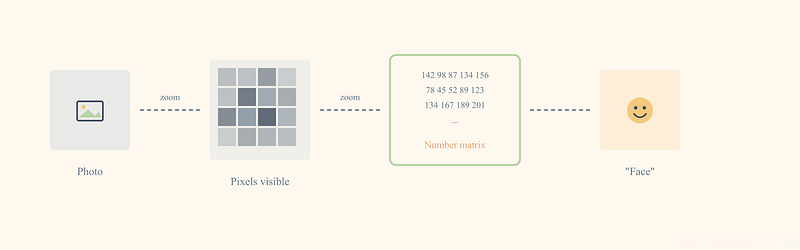
Each pixel has a color, and in a computer, color is represented with numbers.
The simplest case is a black-and-white photo: pure black is 0, pure white is 255, and shades of gray fall between 1 and 254. Smaller numbers mean darker; larger numbers mean brighter.
For example, this little 5×5 image:
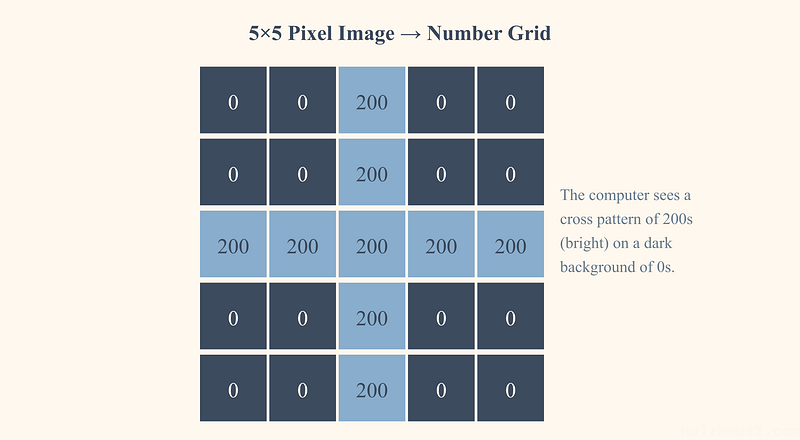
To the computer, it’s just a table like this:
0   0  200   0   0
  0   0  200   0   0
200 200  200 200 200
  0   0  200   0   0
  0   0  200   0   0
0 is black, 200 is bright (close to white). Can you see the cross shape? — the middle row and column are 200 (bright), and everything else is 0 (dark).
This is what the computer “sees.” Not an image — numbers.
Color photos are a bit more complicated: each pixel needs three numbers, representing the intensity of red, green, and blue (also 0 to 255). But the principle is exactly the same — at the end of the day, it’s still numbers.
So when you hold your phone up to your face, this is what the phone “sees”:
142  98  87 134 156 178 ...
 78  45  52  89 123 145 ...
134 167 189 201 178 156 ...
... (millions of numbers)
The phone’s job is: look at these millions of numbers and decide, “Is this the owner’s face?”
How can a pile of numbers possibly recognize a face?
The First Clue: Edges
What is an edge? It’s a place in a photo where colors suddenly change.
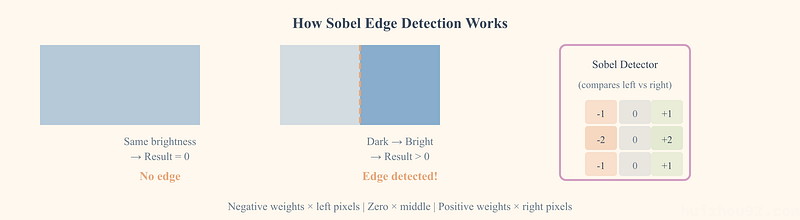
For example, the boundary between your face and the background — your skin is light-colored, the background might be dark. That creates an edge, which is the outline of your face. Your eyes too: the whites are light, the pupils are dark. Also an edge.
Edges outline the places in a photo where “something is there.” Once you’ve found the edges, you’ve found contours, facial features, expressions — the elements that make a face unique.
But the computer only sees numbers. It doesn’t know what a “face” is, or what “eyes” are. How does it find edges?
The answer surprised me: using nothing more than simple addition, subtraction, multiplication, and division.
Let me demonstrate with a concrete example.
A Simple Math Problem
Suppose we have a small patch of an image — just 9 pixels arranged in a 3×3 grid:
10  10  10
10  10 200
10 200 200
The top-left is dark (the number 10, close to black), and the bottom-right is bright (the number 200, close to white). There’s a diagonal dividing line from top-left to bottom-right — that’s an edge.
Now I’ll scan it with a “detector.” A detector is just a small template made of numbers — overlay it on an image, and it can detect whether a certain type of feature is present. This detector is also 9 numbers:
-1  0  1
-2  0  2
-1  0  1
This detector is called the Sobel operator (an “operator” just means “a computing tool”). It’s specifically designed to detect vertical edges. Why can these particular numbers detect edges? Let’s first see how to use it, and you’ll understand soon.
How do you use it? Lay the detector over the image, multiply the numbers at corresponding positions, and add them all up.
Let me calculate it step by step for you:
Image:          Detector:
10  10  10     -1  0  1
10  10 200     -2  0  2
10 200 200     -1  0  1

Multiply at each position, then sum everything:
(10×-1) + (10×0) + (10×1) +
(10×-2) + (10×0) + (200×2) +
(10×-1) + (200×0) + (200×1)

= -10 + 0 + 10 +
  -20 + 0 + 400 +
  -10 + 0 + 200

= 570
The result is 570, a large positive number.
What this number means: there is a clear edge here, with colors getting brighter from left to right. The larger the number, the more pronounced the edge.
What if we use a region where all the colors are the same and there are no edges?
Image:          Detector:
100 100 100    -1  0  1
100 100 100    -2  0  2
100 100 100    -1  0  1

Calculation:
(100×-1) + (100×0) + (100×1) +
(100×-2) + (100×0) + (100×2) +
(100×-1) + (100×0) + (100×1)

= -100 + 0 + 100 +
  -200 + 0 + 200 +
  -100 + 0 + 100

= 0
The result is 0. No edge.
See? You don’t need to know what a “face” or “eyes” are at all. With just addition, subtraction, multiplication, and division, you can find the places in an image where colors change.
In practice, this detector slides across the entire image, one step at a time, performing this calculation at every position. This produces a new “edge map” — at every position in the original image, the number now tells you “whether there’s an edge here.” Where the numbers are large, that’s where the edges are.
This is the first step of how a computer “sees” an image: finding all the places where colors change abruptly.
Why Does This Detector Work?
You might be curious: where did those numbers -1, 0, 1, -2, 0, 2, -1, 0, 1 come from? Why does this arrangement detect edges?
Let me explain the logic.
Look closely at the structure of this detector: the left column is all negative, the right column is all positive, and the middle column is all zero.
-1  0  1
-2  0  2
-1  0  1
When it scans a region of the image, what it’s really doing is:
- Brightness of right pixels × positive numbers (adds points)
- Brightness of left pixels × negative numbers (subtracts points)
- Middle pixels × 0 (no effect on the result)
So the final result is, essentially: brightness on the right — brightness on the left.
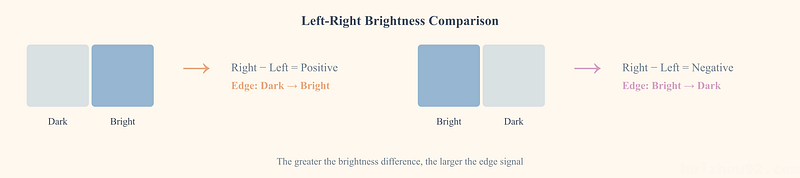
- If left and right are the same color — positives and negatives cancel out, result is 0 (no edge)
- If the right is brighter than the left — the positive side contributes more; the result is positive (an edge from dark to bright)
- If the left is brighter than the right — the negative side contributes more; the result is negative (an edge from bright to dark)
The greater the difference, the larger the resulting number (positive or negative), indicating a more prominent edge.
As for why the middle column’s coefficients (-2, 0, 2) are larger than those on the sides (-1, 0, 1) — that’s to make the detector pay more attention to changes in the exact center row, yielding more stable detection results.
It’s a clever design, but also a simple one — at its core, it’s just “comparing brightness between left and right.”
By the way, here’s the origin of this detector: the Sobel operator was proposed by Irwin Sobel and Gary Feldman in a talk at the Stanford Artificial Intelligence Laboratory in 1968, and it’s been in use for over half a century.
But you might have already spotted a problem: this detector can only find vertical edges (left-right brightness differences). What about horizontal edges (top-bottom brightness differences)?
Simple — rotate the detector 90°:
-1  -2  -1
 0   0   0
 1   2   1
See it? Now the top row is all negative, the bottom row is all positive, and the middle row is all zero. The principle is exactly the same, just the direction has changed: it compares “brightness below — brightness above.”
- If the top and bottom are the same color — the result is 0 (no horizontal edge)
- If the bottom is brighter than the top — the result is positive (a horizontal edge)
Use both detectors together — one for left-right, one for top-bottom — to find edges in any direction in an image. Even a 45° diagonal line will produce brightness differences in both the left-right and top-bottom directions, so both detectors will give non-zero results. Combining both results gives you the “edge strength” and “edge direction” at each position.
From Edges to Shapes: AI Was Stuck for Decades
So you’ve found the edges. Now what?
The 1968 Sobel operator could find edges, but edges are just a bunch of lines. A bunch of lines still doesn’t tell us “this is a face.”
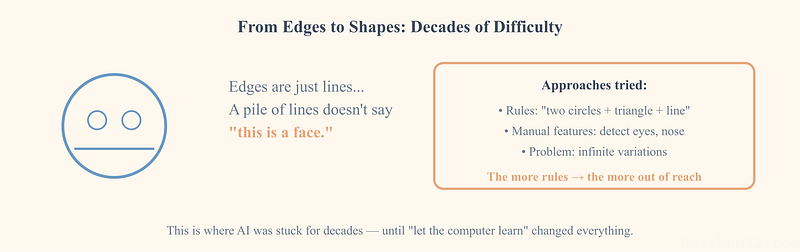
This is where AI has been stuck for decades when it comes to “seeing.”
Scientists tried many approaches:
- Some tried writing rules: “If there are two circles on top, a triangle in the middle, and a horizontal line below, that might be a face”
- Some tried extracting more complex features: “detect the shape of eyes,” “measure the position of the nose”
But all these methods hit the same wall: you needed humans to tell the computer what “eyes” and “nose” are.
A person’s face can have countless expressions, countless angles, countless lighting conditions. What about a side profile? What about wearing a hat? What if only half the face is visible?
How could you possibly write rules for all cases?
The more rules you wrote, the more the real world’s complexity stayed out of reach.
This dilemma persisted for decades — until one idea changed everything:
Don’t have humans design the detectors. Let the computer learn on its own.
The Core Breakthrough: Let the Computer Learn
Remember the Sobel operator from earlier?
-1  0  1
-2  0  2
-1  0  1
Those 9 numbers were designed by humans. Humans knew that “to detect vertical edges, you compare brightness between left and right,” so they chose this particular combination of numbers.
But what if we let the computer choose them instead?
Suppose we no longer specify those 9 numbers, but instead make them “empty” — able to be filled with any values:
?  ?  ?
?  ?  ?
?  ?  ?
Start by filling them randomly, say:
0.1  -0.3   0.5
0.2   0.1  -0.4
0.3   0.2   0.1
Use this random detector to scan images, and the results will be total chaos.
But what if we tell the computer the “right answer”?
Like a teacher grading homework. Let’s use an easier task to illustrate this process — telling cats apart from dogs. Don’t worry, the learning process for face recognition is exactly the same.
Show the computer 1000 cat photos and 1000 dog photos, each labeled — “this is a cat,” “this is a dog.”
The computer computes a result using its random detectors and compares it to the correct answer:
- If it guessed right — good, keep the numbers
- If it guessed wrong — adjust those 9 numbers so it’s more likely to guess right next time
How does it adjust? Not by random fiddling — there’s an elegant method for calculating whether each number should go up or down. This method is called “backpropagation,” and I’ll cover it in detail later. For now, just know that the computer can determine the direction and magnitude of each adjustment.
Repeat this process millions of times.
Something magical happens: those originally random numbers transform themselves into meaningful detectors.
Some become edge detectors (similar to the Sobel operator — the computer “invented” something similar on its own).
Some become color-change detectors.
Some become texture detectors.
And some detect things that even humans can’t quite describe — but they’re genuinely useful for telling cats from dogs.
The computer was never told, “detect edges.” It discovered on its own that “detecting edges helps distinguish cats from dogs.”
This is the essence of “learning”: it’s not that someone taught it rules, but rather, from massive amounts of right/wrong feedback, it found useful patterns on its own.
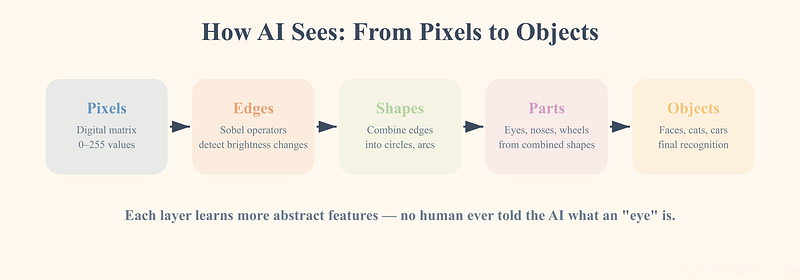
Stacking Layers: From Lines to Faces
But one layer of detectors isn’t enough.
An edge detector can only tell you “there’s a line here” — it can’t tell you “this is an eye.”
The solution: stack many layers together.
Imagine this process:
- First layer of detectors: find various edges from the raw pixels — horizontal lines, vertical lines, diagonals, curves
- Second layer of detectors: combine the edges found by the first layer, recognize simple shapes — circles, triangles, arcs
- Third layer of detectors: combine shapes into parts — eyes (an oval formed by two arcs), a nose (a triangular outline), a mouth (two curves)
- Fourth layer of detectors: combine parts into wholes — human face, cat face, car
Pixels → Edges → Shapes → Parts → Whole Object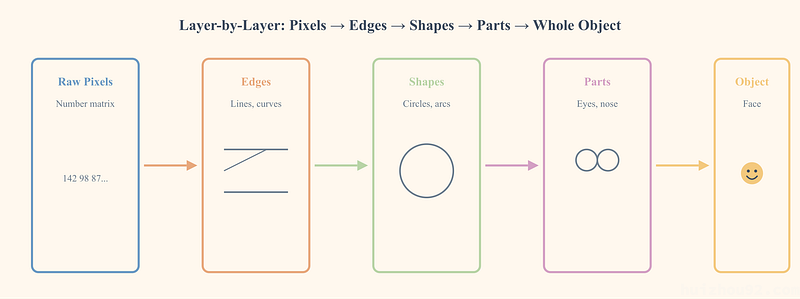
Each layer detects more complex things based on the previous layer. The first layer can only see lines, but after stacking four or five layers, it can “see” a face.
This is what the “deep” in “deep learning” means — many layers of detectors stacked together. The more layers, the more complex the things it can recognize.
This structure of “many layers of detectors stacked together” has a name: neural network. It’s called that because the way it works is somewhat like neurons in the human brain — each neuron receives signals, processes them a bit, and passes them on to the next.
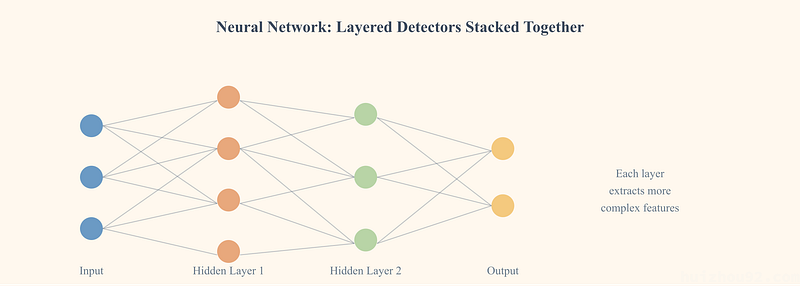
This analogy traces back to a 1943 paper by McCulloch and Pitts, who were the first to describe the workings of neurons mathematically. But you don’t need to take this analogy too seriously — it’s really just a computational structure of “passing through layers, processing at each layer.” A neural network with many layers is called a “deep neural network,” and the method of using it to learn is “deep learning.”
And here’s the key: the numbers inside each layer’s detectors are not designed by humans — they’re learned by the computer from data.
In 2012, Alex Krizhevsky, a student of neural network pioneer Geoffrey Hinton, used this “multi-layer stacking” approach to build an image recognition program, named AlexNet (Alex’s network). It had 8 layers. The first 5 layers did exactly the operation we demonstrated earlier — sliding detectors across the image, multiplying at each position, and summing (the technical term for this operation is “convolution,” so these layers are called “convolutional layers”). The last 3 layers were responsible for aggregating all the information extracted by the earlier layers to make a final judgment (called “fully connected layers” — you can think of them as “aggregating votes,” pooling all the information discovered by all the detectors to make a comprehensive final decision).
The entire network contained 60 million adjustable numbers. These adjustable numbers have a special name in the AI field: parameters. AlexNet’s 60 million parameters shocked the entire computer vision community. And today’s large models easily have dozens or hundreds of layers, with parameter counts in the billions.
Training: How Does the Computer Know Which Way to Adjust?
You might still remember the question we left hanging earlier: when it guesses wrong, how does the computer know whether to make those numbers bigger or smaller?
This is the most elegant part of the entire system, called backpropagation — a foundational paper published in 1986 by Rumelhart, Hinton, and Williams in Nature (one of the world’s most authoritative scientific journals) established this method.
Let me illustrate with a simplified example.
Suppose the computer needs to judge whether an image is a cat or a dog. After layer upon layer of computation, it outputs “60% chance it’s a cat,” but the correct answer is “dog.”
It’s wrong. How wrong? Very wrong — it said 60% cat, but it should be 0%.
What backpropagation does: starting from the final error, it traces backward layer by layer, calculating how much each number “contributed” to that error.
It’s like checking your answers after an exam:
- The final result was wrong
- Because a certain number in the last step was off
- That number was off because the output of a certain detector in the previous layer was off
- That detector was off because one of its internal numbers should have been a bit larger
The computer calculates: if a certain number within a certain detector were increased by just a tiny bit, would the final error increase or decrease?
- If smaller — good, increase that number a little
- If larger — do the opposite, decrease that number a little
Each adjustment is tiny (like 0.001), but by doing these micro-adjustments to all numbers simultaneously, repeated millions of times, those numbers gradually stabilize into a state where they “rarely make mistakes.”
This is “training.”
A modern face recognition model might have millions to hundreds of millions of parameters. For example, Google’s FaceNet, published in 2015, had a flagship model with over 100 million parameters, achieving 99.63% accuracy on LFW (Labeled Faces in the Wild, a test set of real-world face photos collected from the internet, containing over 13,000 photos of 5,749 people). Training such a model requires showing the computer millions of face photos, adjusting every parameter for each one.
This demands enormous computation.
Why Did It Only Succeed in 2012?
You might wonder: if the idea of “letting the computer learn on its own” is so good, why wasn’t it achieved sooner?
In fact, the concept of neural networks dates back to the 1940s, and the backpropagation algorithm was published in 1986.
So why the sudden success in 2012?
Because three conditions finally came together at the same time:
1. Data
In 2009, Professor Fei-Fei Li’s team at Stanford released the ImageNet dataset. This dataset ultimately contained over 14 million labeled images, spanning more than 20,000 categories.
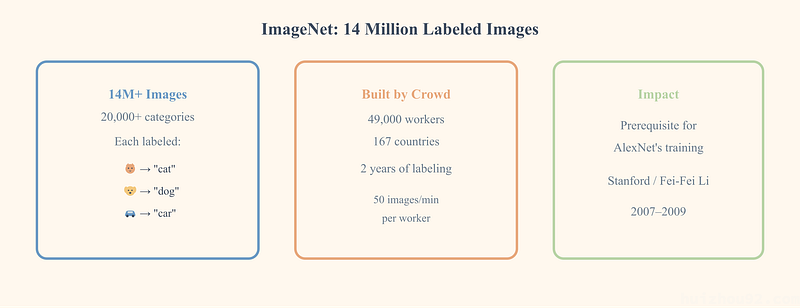
“Labeled” means: for every image, someone has told you “this is a cat,” “this is a dog,” “this is a car.” These “correct answers” are the prerequisite for the computer to learn — without answers, you can’t judge right from wrong, and you can’t adjust those numbers.
Before this, no one had put in the enormous effort to collect and label so many images. To build ImageNet, Fei-Fei Li’s team used Amazon’s crowdsourcing platform (a platform that breaks tasks into small pieces and distributes them to large numbers of online workers), mobilizing nearly 50,000 labeling workers from 167 countries, filtering and labeling from 160 million candidate images.
2. Computing Power
Training a model requires repeatedly performing calculations on millions of images and tens of millions of parameters. Using a regular computer’s CPU (Central Processing Unit, the computer’s “brain,” good at handling complex tasks one at a time), this could take months or even years.
The 2012 breakthrough used a clever approach: using gaming graphics cards (GPUs, Graphics Processing Units) for computation.
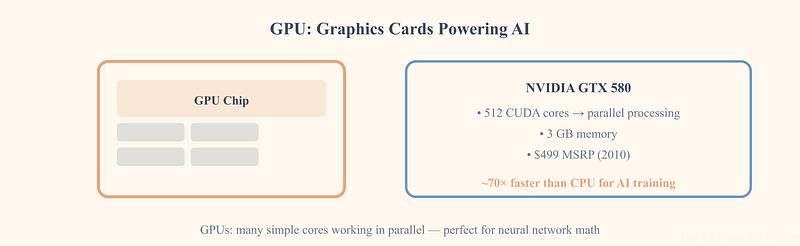
GPUs were originally designed to render game graphics. Game graphics require computing the colors of millions of pixels on screen simultaneously, so GPUs are especially good at “doing many simple calculations at the same time.”
And training neural networks happens to be exactly this kind of work — performing massive amounts of simple addition and multiplication on millions of numbers.
In 2009, Andrew Ng’s team at Stanford published a paper demonstrating that for specific tasks, GPU-trained neural networks were about 70 times faster than CPU-trained ones.
Alex Krizhevsky used exactly two gaming graphics cards (NVIDIA GTX 580, priced at $499 at the time), spending about 5–6 days to train AlexNet.
3. Algorithm
AlexNet also employed several critical technical improvements. For example, a mathematical trick that makes deep networks easier to train (called ReLU), and a method to prevent the network from “rote-memorizing” training data (called Dropout — randomly “turning off” some detectors, forcing the network to learn more general patterns rather than memorizing every detail of every image). These techniques made deeper networks trainable.
Three conditions — massive data, GPU computing power, and algorithmic improvements — all came together simultaneously, enabling the 2012 breakthrough.
How stunning was that breakthrough? In the ImageNet image recognition competition, AlexNet slashed the error rate from the second-place entry’s 26.2% directly down to 15.3% (this “error rate” is the top-5 error rate — give the computer 5 chances to guess what’s in the image, and only count it as wrong if all 5 guesses are incorrect) — a lead of over 10 percentage points. To put it in perspective, everyone was competing around the 74-point mark when someone suddenly scored 85.
Back to Phone Face Recognition
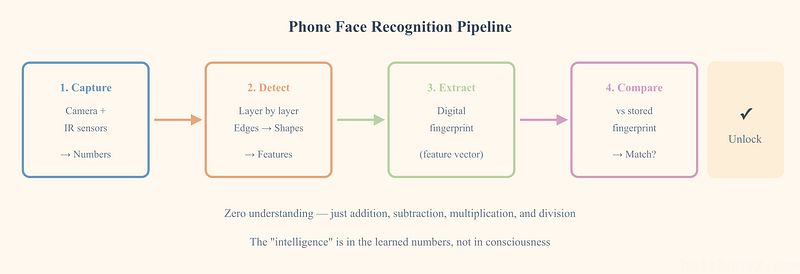
Now you know how your phone recognizes you.
Let me connect the entire process:
- Capture facial data: The phone uses its camera and sensors to capture your facial information, converting it into millions of numbers (a note: modern phone face unlock doesn’t just rely on a regular camera — for example, iPhone’s Face ID projects tens of thousands of invisible dots onto your face using infrared light, measuring the 3D shape of your face so it can’t be fooled by a photo. But the core recognition principle — converting captured data into numbers, extracting features layer by layer — is exactly the same as what we’ve covered)
- Layer-by-layer detection: These numbers pass through many layers of detectors — the first layer finds edges, the second finds shapes, the third finds facial features, stacked layer upon layer
- Extract features: The final layer outputs a set of numbers — you can think of them as the “digital fingerprint” of your face (the technical term is “feature vector,” meaning a string of numbers that represents the characteristics of your appearance)
- Compare: Compare this digital fingerprint with the one stored when you first enrolled your face
- Decision: If the two sets of numbers are close enough — unlock
There is zero “understanding” in this entire process.
Your phone doesn’t know what eyes are, or what a nose is. It’s just doing addition, subtraction, multiplication, and division: turning pixels into edges, edges into shapes, shapes into parts, parts into a set of numbers representing your face, then comparing how close two sets of numbers are.
The numbers inside those detectors were “learned” from millions of face photos. No one told the computer “detect eyes” — through repeated rounds of “guessed right/guessed wrong,” it discovered on its own that certain combinations of numbers are especially useful for distinguishing different faces.
This is AI’s “intelligence”: not genuine understanding, but rather the discovery of recurring patterns in massive amounts of data — like “the pixels around the eye region tend to exhibit this particular combination of numbers.”
Now we can answer the question from the beginning of this article: why does your phone not recognize you with a mask on, but still recognizes you after a haircut?
Because a mask covers the lower half of your face, facial features like the mouth and chin are hidden, making the digital fingerprint extracted by the detectors too different from the one recorded during enrollment. A hairstyle, on the other hand, is at the periphery of the face — the detectors focus mainly on the features in the central facial region. Change your hairstyle, and the numerical patterns around your eyes and nose bridge remain the same, so it can still match.
But you may have noticed that some newer phones can now unlock even with a mask on — that’s because manufacturers later retrained their models specifically with large numbers of masked-face photos, teaching the detectors to recognize you based solely on features around the eyes and eyebrows.
A New Question
After understanding how AI “recognizes people,” a new question arose for me:
AI can “see” — images are number matrices in its view, and it extracts features from those numbers through layers of detectors.
But what about text?
When you say “apple” to ChatGPT, what does it “see”? Not a picture of a fruit, not the taste of a bite — so what does it “see”?
How does text become numbers? And how does AI “understand” what those numbers mean?
In the next article, we’ll explore this question. You’ll see an example that absolutely blew my mind: “king” minus “man,” plus “woman,” equals what?
References
- Sobel operator — Wikipedia — The Sobel operator was proposed by Irwin Sobel and Gary Feldman at the Stanford Artificial Intelligence Laboratory in 1968
- A logical calculus of the ideas immanent in nervous activity — McCulloch & Pitts (1943) — The first mathematical model of a neuron, the origin of the “neural network” name
- ImageNet Classification with Deep Convolutional Neural Networks — Krizhevsky, Sutskever, Hinton (2012) — The AlexNet paper: 8 layers, 60 million parameters, top-5 error rate 15.3%
- AlexNet — Wikipedia — AlexNet architecture details and parameter count
- FaceNet: A Unified Embedding for Face Recognition and Clustering — Schroff, Kalenichenko, Philbin (2015) — Google’s face recognition model, 99.63% accuracy on LFW
- Labeled Faces in the Wild — Official page for the LFW face recognition benchmark
- Learning representations by back-propagating errors — Rumelhart, Hinton, Williams (1986) — The foundational paper for the backpropagation algorithm, published in Nature
- ImageNet: A Large-Scale Hierarchical Image Database — Deng, Dong, Socher, Li, Li, Fei-Fei (2009) — The ImageNet dataset paper, over 14 million labeled images
- The data that transformed AI research — and possibly the world — Quartz — The story of ImageNet’s construction: 49,000 labeling workers from 167 countries
- Large-scale Deep Unsupervised Learning using Graphics Processors — Raina, Madhavan, Ng (2009) — GPU training is about 70× faster than CPU for neural networks
- NVIDIA GeForce GTX 580 — VideoCardz — GTX 580 released November 2010, MSRP $499