Your CLI Tool Has a New Primary User. It’s Not Human.
Your CLI Tool Has a New Primary User. It’s Not Human.. AI TOOLS Your CLI Tool Has a New Primary User. It’s Not Human. I ran cli-agent-lint against a few CL。
AI TOOLS
Your CLI Tool Has a New Primary User. It’s Not Human.
I ran cli-agent-lint against a few CLI tools I maintained last week. One scored a D.
The tool had reasonable documentation, decent help text, and error messages that made sense to a human reading them. However, it hung for eight seconds when called non-interactively, mixed error output with stdout, and printed ANSI color codes in every response. For me, at a terminal, it is barely noticeable. For an AI agent running it as a subprocess: three separate blocking problems.
cli-agent-lint is a Go project that appeared in Golang Weekly #596. It audits CLI tools for "agent readiness" — 34 checks across 5 dimensions, scored A through F. The project has fewer than 30 GitHub stars. But it puts a number on something worth paying attention to in 2026.
The Mismatch Nobody Designed for
Claude Code, Codex, and Gemini CLI are constantly calling git, docker, kubectl, and gh. LLM training data is saturated with terminal interactions — man pages, Stack Overflow threads, GitHub issues. CLI is close to the native language of large language models.
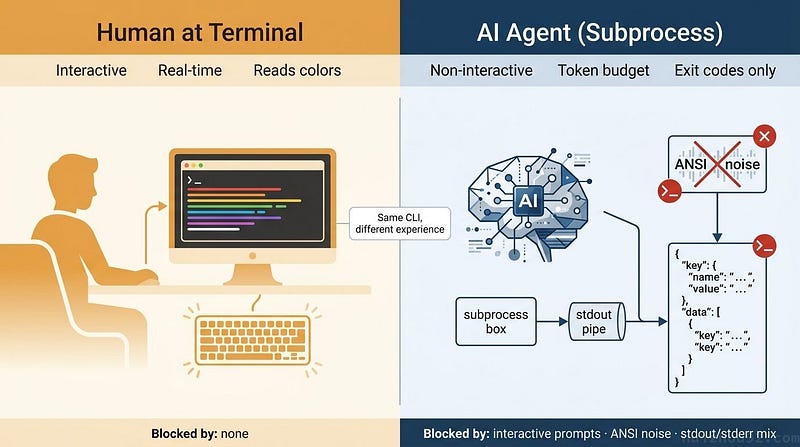
But agents invoke CLIs differently from people.
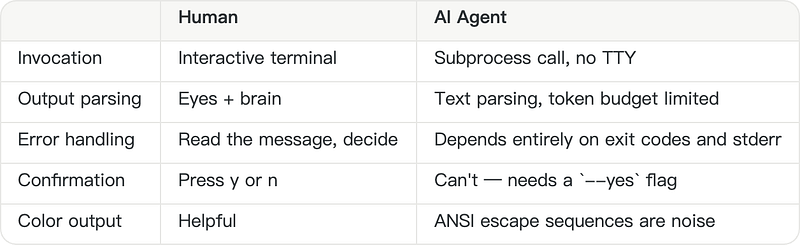
A CLI that prompts Are you sure? [y/n] in a non-TTY context will hang an agent indefinitely. A --help that outputs 100KB will eat a significant slice of the context window on every invocation. An error message printed to stdout gets parsed as successful output.
These aren’t bugs. They’re design decisions that made sense when the only user was a person at a keyboard.
What Cli-agent-lint Checks
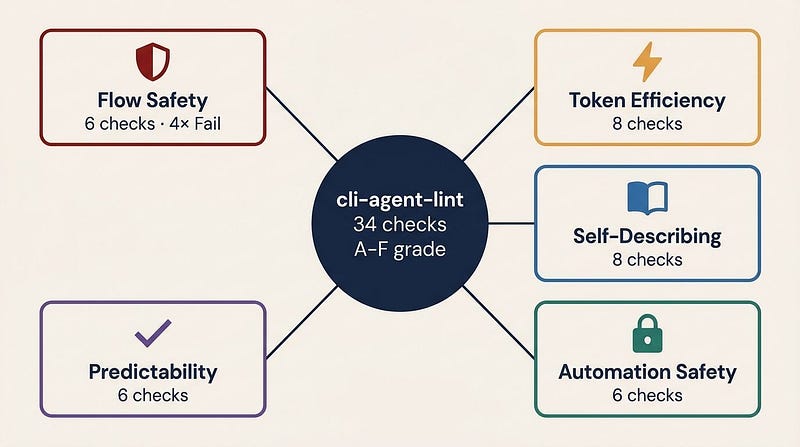
The tool recursively executes --help on the target CLI, builds a command tree, classifies each command (IsMutating, IsDestructive, IsListLike, IsReadOnly), and then runs checks in two phases: passive (analyzing help text) and active (executing commands with a 5-second timeout).
Flow Safety — 6 checks, 4 at Fail severity
Interactive prompt detection works by running a non-destructive command and measuring its execution time. Hang past 5 seconds, Fail. stderr/stdout separation is tested by invoking a nonexistent subcommand and checking where the error lands. Exit code compliance verifies that --help returns 0 and invalid commands return non-zero.
These checks block agent execution entirely if they fail. A D-grade tool usually has at least one of them failing.
Token Efficiency — 8 checks
Help text over 40KB triggers a warning. Over 100KB is a Fail. JSON output support is detected by searching for --output, --format, or --json flags. The dimension also looks for --no-color, --quiet, pagination controls (--limit, --page-size), and field filtering (--fields, --jq).
The 40KB threshold sounds generous until you remember that a single invocation consuming 40K tokens of context happens before the agent does anything with the output.
Self-Describing — 8 checks
Can an agent learn to use the CLI purely from its own help output? Checks look for an Examples section, structured error messages, and parseable semver version strings. One heuristic I found interesting: more than 15 subcommands at a single level is flagged as Info. Too many options make it harder for LLMs to pick the right one.
There’s also a check for AGENTS.md, CLAUDE.md, llms.txt, or .mcp.json near the binary files written explicitly for AI agents, which cli-agent-lint treats as a positive signal.
Automation Safety — 6 checks
Destructive commands (delete, rm, destroy) are checked for --yes or --force bypass flags. Path traversal detection injects ../../tmp/.cli-agent-lint-test-NONEXISTENT as a filename argument and checks whether the CLI handles it correctly. Control character injection tests \x01\x02\x03 inputs. The dimension also checks for the --dry-run and idempotency flags, such as --if-not-exists.
Predictability — 6 checks
Running --help twice should produce identical output. If your CLI includes timestamps or rotating tips, agents can't reliably cache the response. Other checks look for exit-code documentation, operation reporting (does delete report how many items were removed, or succeed silently?), and--timeout support.
The Scoring Math
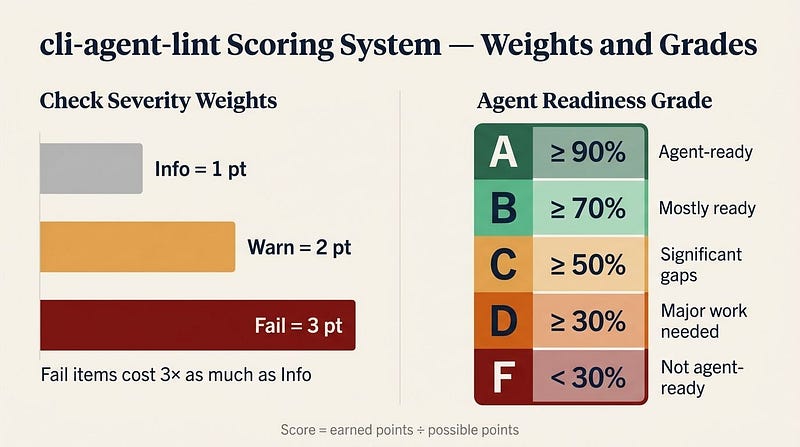
Info=1, Warn=2, Fail=3. Passing a check earns its weight; failing earns zero. Final score is earned points divided by possible points, bucketed: A (≥90%), B (≥70%), C (≥50%), D (≥30%), F (<30%).
The weighting means a single Flow Safety Fail costs three times as much as an Info-level subcommand count flag. A CLI that hangs on agent invocation is more broken than one that’s slightly verbose about its help text.
How It’s Built
Two external dependencies — spf13/cobra and mattn/go-isatty — under 3,000 lines of Go, no CGo.
The command discovery engine parses help text from multiple CLI frameworks: Cobra, Click, Typer, argparse, and Clap. It handles trees up to 5 levels deep, caps at 1,000 total commands, and uses atomic.Int32 for concurrency control. Each discovered command is automatically classified based on naming patterns.
The two-phase execution (passive then active) handles check dependencies. The structured error format check (SD-1) runs only if the JSON output check (TE-1) has already passed — no point verifying the error JSON format if the CLI doesn't support JSON at all.
Parallelism runs at max(4, runtime.NumCPU()). For a typical CLI with a few dozen commands and 34 checks, it finishes in a few seconds.
The tool applies its own principles to itself: --json, --no-color, --quiet, structured errors, documented exit codes. I haven't run it against itself, but it would be a reasonable sanity check.
CLI and MCP Are not Competing
MCP (Model Context Protocol) is becoming how agents connect to external tools. Does that make CLI design irrelevant?
No. MCP has constraints that matter in practice: initialization loads tool schemas that can require tens of thousands of tokens; the ecosystem has active security concerns around tool poisoning and shadowing; and coverage remains limited. git commit, docker build, and kubectl apply are not going through MCP anytime soon.
The framing I find more useful: CLI handles the execution layer — local, low-latency, high-frequency calls. MCP handles the connection layer — remote service discovery, unified auth, and audit trails. They’re not competing for the same job.
If You Maintain a CLI
Six things that move the score most, in rough order:
Add --json or --output json. Structured output removes the text-parsing guesswork on every invocation.
Fix stdout/stderr separation. Errors go to stderr, normal output to stdout. If you’re not certain which is which in your codebase, check now.
Add --yes to destructive commands. Agents need a way to bypass confirmation without interactive input.
Keep the root -- help under 40KB. Subcommand help can be longer — the root is loaded every time an agent tries to understand your tool.
Add --no-color and respect the NO_COLOR environment variable.
Document exit codes. A short “EXIT STATUS” section in your help text costs almost nothing.
go install github.com/Camil-H/cli-agent-lint@latest
cli-agent-lint check ./your-cli-tool
If you score below B, the Fail-level items are where to start. In my experience, interactive prompt hangs and stdout/stderr confusion account for most of the agent failures I’ve debugged — they’re quiet failures, which makes them worse. The agent doesn’t error loudly. It just stops making progress.
Sources: cli-agent-lint on GitHub | Hacker News discussion | Golang Weekly #596