WinBoat: Run Windows Apps Natively on Linux with Seamless Desktop Integration
TL;DR: Open-source tool combines Docker containers + QEMU/KVM + RemoteApp to run Windows applications as native Linux windows. 3.6k GitHub…

TL;DR: Open-source tool combines Docker containers + QEMU/KVM + RemoteApp to run Windows applications as native Linux windows. 3.6k GitHub stars, active development, addresses the biggest barrier to Linux desktop adoption.
The Problem Everyone Knows
Linux desktop adoption has stalled at ~3% for decades. Not because Linux isn’t good — it’s often superior for development, security, and system administration. The blocker? Professional software.
Try explaining to a designer why they can’t use Adobe Creative Suite. Tell an accountant they need to abandon Excel macros. Watch a CAD engineer’s face when you mention FreeCAD alternatives.
Wine exists but breaks constantly. VMs work but feel clunky. Dual-boot is annoying. We needed something better.
Enter WinBoat
WinBoat takes a different approach: run a full Windows VM inside Docker, then use Microsoft’s own RemoteApp protocol to render individual Windows applications as native Linux windows.
Architecture Overview:
Linux Host (Electron app)
├── Docker Container
│   └── QEMU/KVM Windows VM
│       └── WinBoat Guest Server (Go)
└── FreeRDP clients → Individual app windows
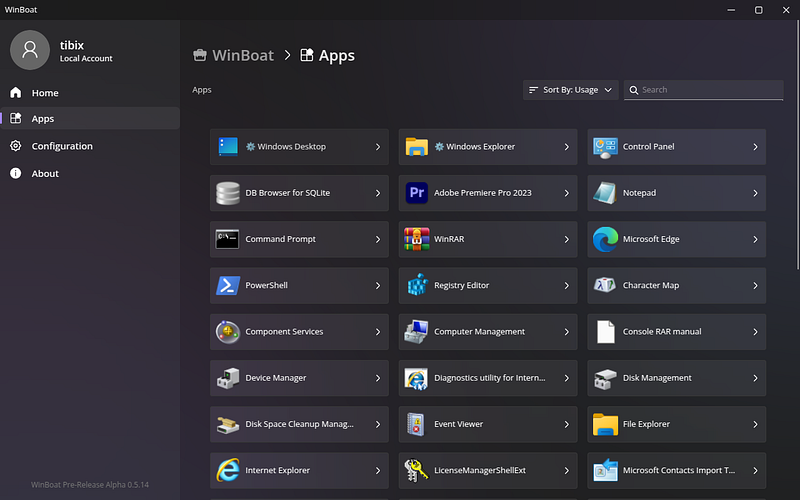
The magic happens with the Guest Server — a Go daemon running inside Windows that:
- Scans the registry for installed apps
- Extracts icons and metadata
- Communicates with the Linux host
- Launches apps via RemoteApp
What It Looks Like
Imagine this: you’re running Ubuntu, but Photoshop appears in your Alt+Tab switcher alongside Firefox and VS Code. The Windows app has a native Linux window frame, shows up in your taskbar, and you can drag files from Nautilus directly into it.
Key Integration Features:
- Windows apps appear as individual Linux windows
- Shared clipboard between systems
- Linux home directory auto-mounted in Windows
- Audio routing through RDP
- Smartcard passthrough support
No weird desktop-in-a-window. No switching between systems. Just applications that happen to be running Windows under the hood.
Technical Implementation
The system uses three-layer isolation:
Layer 1: Host Management
- Electron frontend for user interaction
- Docker API communication
- FreeRDP session management
Layer 2: Container Isolation
- Docker provides security boundaries
- QEMU/KVM for hardware virtualization
- Network bridging for RDP communication
Layer 3: Windows Guest
- Full Windows installation
- WinBoat Guest Server daemon
- Target applications
Resource Requirements:
- 4GB RAM minimum (8GB recommended)
- 2+ CPU cores with KVM support
- 32GB storage
- Modern Linux distro with Docker
Development Momentum
Project stats tell the story:
- 3,600+ GitHub stars in under a year
- 85+ forks with active contributions
- Frequent releases (latest: v0.7.11, Sept 13, 2025)
- Active Discord community
Recent improvements:
- Enhanced app detection algorithms
- RDP connection monitoring
- User group detection fixes
- Guest server performance optimizations
Real-World Use Cases
Creative Professionals: Adobe Creative Suite remains the industry standard. WinBoat lets designers stay on Linux while accessing Photoshop, Illustrator, and Premiere Pro.
Business Users: Microsoft Office with full macro support, advanced PDF editing, industry-specific Windows software — all running seamlessly on Linux.
Developers: Windows-specific development tools, legacy application testing, and cross-platform debugging without leaving your Linux workflow.
Enterprise Deployment: IT departments can deploy Linux for security/stability while maintaining compatibility with critical Windows applications.
Current Limitations
Being beta software, WinBoat has constraints:
Technical Limitations:
- No GPU passthrough (yet — planned for future releases)
- Games with kernel-level anti-cheat won’t work
- Requires a relatively complex setup
- Significant resource overhead
Compatibility Issues:
- Some applications may have licensing restrictions
- Hardware-dependent software needs evaluation
- Performance varies by application type
Future Roadmap
The development team is actively working on:
Performance Improvements:
- GPU acceleration research
- Looking Glass integration
- Paravirtualized driver optimization
Usability Enhancements:
- Automated USB device management
- Podman support as a Docker alternative
- Flatpak distribution for easier installation
Enterprise Features:
- Centralized management tools
- Policy enforcement capabilities
- Scalable deployment solutions
Why This Matters
WinBoat represents a paradigm shift in cross-platform compatibility. Instead of trying to reimplement Windows APIs (Wine) or accepting poor integration (traditional VMs), it leverages Microsoft’s own remoting technology.
This approach offers several advantages:
- Full compatibility: Real Windows, real applications
- Security isolation: Containerized execution
- Native integration: Linux-first user experience
- Professional viability: Enterprise-ready architecture
Installation and Setup
# Clone the repository
git clone https://github.com/TibixDev/winboat.git
# Install dependencies
cd winboat && npm install
# Launch WinBoat
npm start
Prerequisites:
- Docker with KVM support
- Modern Linux distribution
- Windows ISO for VM creation
- Valid Windows license
Community and Support
Project Links:
- GitHub Repository
- Official Website
- Discord community for support
- Active issue tracking and feature requests
Contributing: MIT-licensed, welcoming contributions from developers interested in cross-platform compatibility solutions.
The Bigger Picture
If WinBoat succeeds, it could remove the primary barrier to Linux desktop adoption in professional environments. Organizations could deploy Linux for its security and stability benefits while maintaining access to critical Windows applications.
This isn’t just another compatibility layer — it’s potentially the technology that finally makes “the year of Linux desktop” a reality for professional users.
Current Status: Active beta development, suitable for testing and non-production use.
Disclaimer: WinBoat is beta software. Test thoroughly before production deployment. Windows licensing requirements apply to guest VMs.