OpenClaw 2.0 Makes Installation Easy — Whether You Need It Is Another Question
933 contributors and 16,000 pull requests — easier setup, shared agent sessions, and memory that learns from itself

OpenClaw
OpenClaw 2.0 Makes Installation Easy — Whether You Need It Is Another Question
On August 31, OpenClaw shipped version 2.0, tagged as v2026.8.1. The team gave the release an oddly self-deprecating title: “OpenClaw 2.0, Accidentally.”
933 contributors submitted roughly 16,000 pull requests for this release — about half of all the code OpenClaw has ever merged. After 106 releases in 230 straight days, this one took nearly seven weeks.
But “accidentally” isn’t about scale. It’s about intent.
Setup Finally Stops Getting in the Way
OpenClaw’s real problem was never capability. It was the barrier to entry. On Reddit, someone compared it to Codex the way people compare Linux to macOS: the former is more powerful and more open, but costs you more time debugging; the latter is more restrictive, but closer to working out of the box. Peter, OpenClaw’s creator, knew exactly what that comparison meant.
2.0 moves everything non-essential out of the first-run flow. The new version:
- Scans the machine for existing GPT/Claude subscriptions, API keys, and local models, and reuses whatever it finds
- No longer demands full configuration up front — you land in a conversation and finish setup by talking to the agent
- On mobile, starts with device pairing and permission confirmation instead of a configuration wall
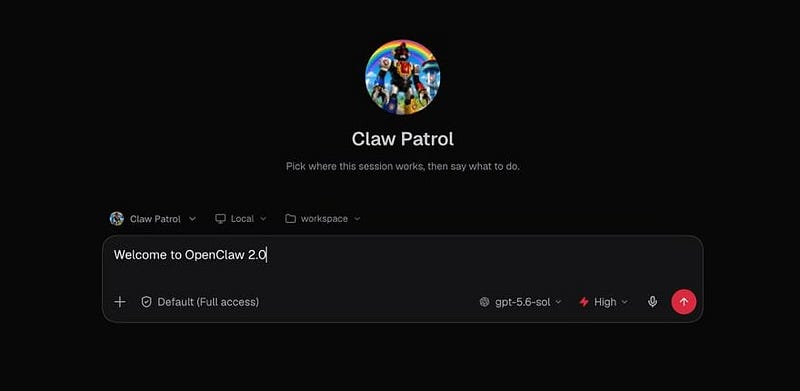
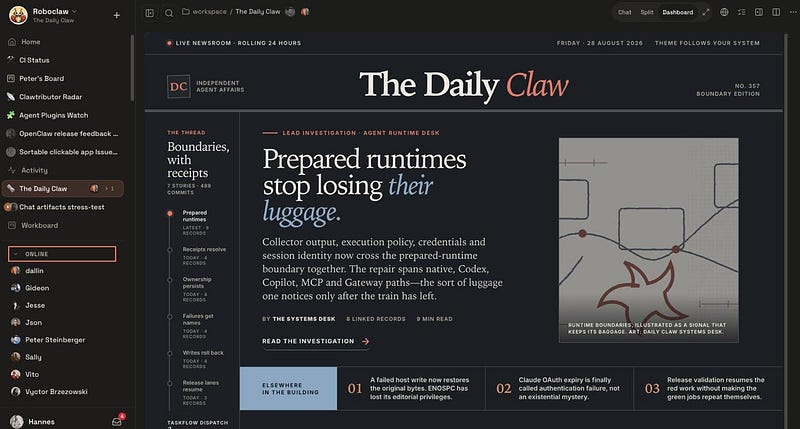
- Rebuilds the browser app into OpenClaw’s first-class entry point: it opens straight into a conversation with the agent, folding chat and file review into one workflow alongside approvals and settings
The browser app is where most people have their first OpenClaw conversation, and it’s now where they can finish setup or return to work already in progress. 2.0’s bet is that users should get a “lobster they can talk to” first, then let memory and skills grow through use, with automation and tools layered on later.
Agent Team: One Person Is Now a Team
The other thing 2.0 changes is what an agent is for: a personal tool becomes something you collaborate with.
In the old OpenClaw, an agent’s context and files lived around a single user’s gateway, tied to whatever task they were running. A second person joining a project had no clean way to take over the work without losing that context.
2.0 adds Shared Cloud Sessions: a running task can move to a cloud worker or a paired device, and teammates can join the same session to watch, participate, or take over in real time. The workspace and existing context travel with the session.
Sessions now have owners, member roles, and presence status — for the first time, OpenClaw has the collaboration structure of actual multiplayer software.
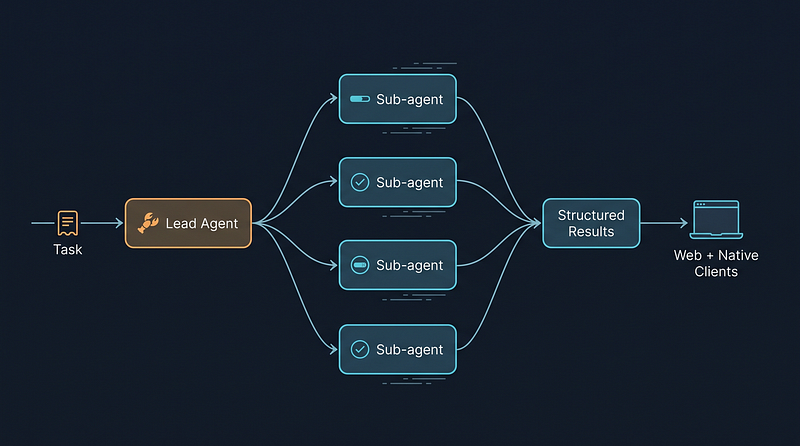
More experimental is Swarm: a lead agent breaks a task into bounded sub-tasks, hands them to multiple sub-agents to run in parallel, then rolls up progress and structured results in the web and native clients. A single task can now start with a human, run locally or in the cloud, get split across parallel sub-agents, and end up handed off to a different teammate entirely.
Memory: Smarter, and Harder to Control
The last piece is also 2.0’s most aggressive bet: memory.
With active memory turned on, OpenClaw can search a given agent’s past private sessions within a personal install, and fold source-tagged content into long-term memory.
By default, the system runs background memory consolidation, writing reusable experience into a “dream journal.” Work patterns that recur and pass an automated review can become new skills and apply without asking. A correction made once can become how the agent executes the next task — it no longer just remembers what you said; it learns from its own experience.
But the stronger the memory, the longer a mistake sticks around. A wrong judgment call, once summarized as “experience,” can contaminate more tasks across more sessions. So 2.0 ships three layers of governance alongside the feature:
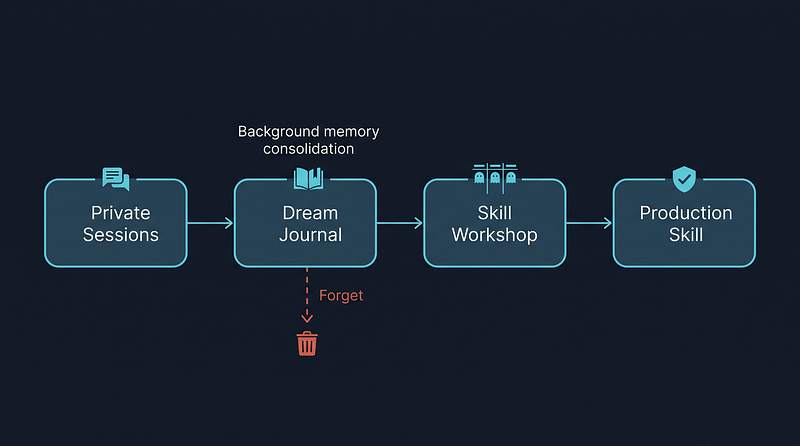
Users can inspect which sessions contributed to a given memory and exclude specific sources
- A “forget” command deletes memories derived from that content while leaving the original sessions intact
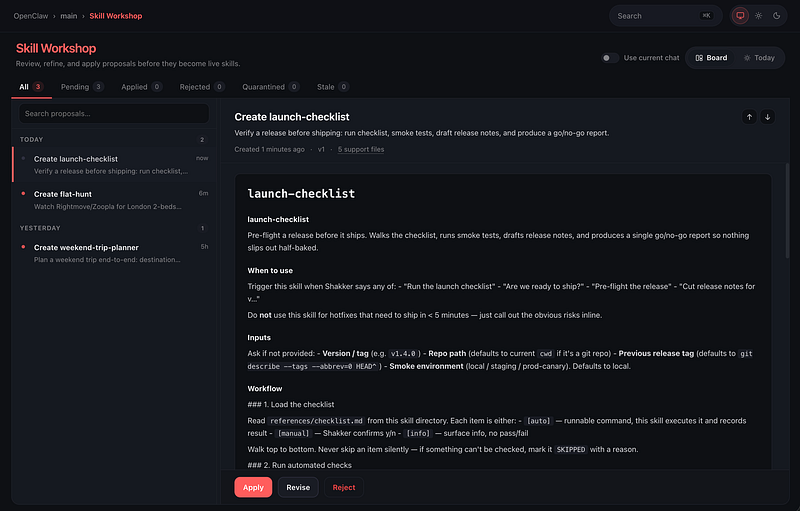
- Skill Workshop lets you organize, merge, and improve the set of learned skills — without pushing them straight to production
Peter made a point during the post-launch Q&A that matters here:
What gets shared isn’t every personal action — it’s the agent sessions that need to move forward together.
The same logic applies to memory: what gets learned on its own isn’t every action — it’s the reviewed, reusable ways of working. That’s governance, not abdication.
Easy to Install, Easy to Pair Up, Hard to Forget
If you compress 2.0 into three changes:
- Easy to install: scans what you already have, runs before it asks you to configure, browser app as the first-class entry point
- Easy to pair up: shared cloud sessions, Swarm sub-agent delegation, no physical proxy device required
- Hard to forget: active memory, dream journal, and a governable way to trace and delete what it learned
The smallest way to start is still one command:
npm install -g openclaw@latestAfter that, run openclaw onboard --install-daemon to start the daemon and configure a Claude backend, check --list-agents to confirm what's running, then pick three to five skills from ClawHub. That's the whole setup.
But if you’re actually going to run 2.0, do three things in the first week:
- Check your AGENTS.md. Is it over 800 lines and maintained by the AI itself? That’s OpenClaw’s own minimum bar for its engineering conventions — copy the skeleton, and you’re covered
- Decide on active memory before you flip it on. Turning it on means accepting the AI learns from your session history. Leave a window of a few days, watch what skills it forms automatically, then decide whether to open it up fully
- Turn on the sandbox by default. 2.0 doesn’t enable it out of the box, but if an agent can run code, call tools, and touch system resources, this switch has to be explicit in any production setup
References:
https://openclaw.ai/blog/openclaw-2-accidentally https://www.theregister.com/2026/08/31/openclaw-20-pours-glitter-on-slow-burning-security-dumpster-fire/ https://x.com/steipete/status/2094290652649636173