> ## Content Index
> Fetch the complete content index at: https://huizhou92.com/llms.txt
> Use this file to discover other available public pages before exploring further.
# HTMX First Experience
- URL: https://huizhou92.com/htmx-first-experience/
- Published: 2025-01-02T02:27:39.000Z
- Updated: 2026-09-08T02:29:33.000Z
- Description: HTMX First Experience. HTMX is a novel front-end development tool that complements existing HTML, CSS, and JavaScript technologies rather than completely r。
- Author: huizhou92
- Tags: #Migrated-1788833207488, #Import 2026-09-08 02:07
> *`HTMX` is a novel front-end development tool that complements existing HTML, CSS, and JavaScript technologies rather than completely replacing them.*
> *`HTMX` can be used with other technologies and tools like Vue.js, React, and Angular. Its core philosophy is “using HTML as the programming language for applications,” meaning dynamic behavior is achieved by adding various attributes to HTML tags, eliminating the need to write extensive JavaScript code.*
### `htmx` Design Philosophy
1. Leverage familiar HTML and CSS knowledge, requiring minimal JavaScript code.
2. Reduce the complexity of front-end development and lessen dependence on complex JavaScript frameworks.
3. Make code more readable and maintainable by specifying behavior directly in HTML through declarative markup.
4. Enable progressive enhancement, allowing web applications to run on varying technology stacks, improving compatibility and accessibility.
HTMX provides a series of custom HTML attributes that allow developers to simplify JavaScript, enabling dynamic interactive functions that initially require complex scripts using only HTML tags. This allows developers to focus on content and structure rather than implementation details of behavioral logic, thus developing modern web applications more quickly and efficiently.
### Installation and Usage
To install and start using `HTMX`, you can integrate it into your web page in several simple ways.
#### 1\. Inclusion via CDN
Add the following `
```
Alternatively, you can use other CDN services or specify a particular version of `HTMX`:
```html
```
Using a CDN is the easiest and fastest way to start using `HTMX`.
#### 2\. Installation using npm or yarn
If your project uses Node.js and npm (or yarn), you can install `HTMX` through a package manager.
- Using npm:
```shell
npm install htmx.org --save
```
- Using yarn:
```shell
yarn add htmx.org
```
- Then import `HTMX` into your JavaScript module or entry file:
```shell
import "htmx.org";
```
Alternatively, you can import it into a specific script file and include it in your final bundled file through a build process (e.g., `Webpack` or `Parcel`).
#### Golang
If you are also a Gopher, then I recommend you to use the `html/template` package to use `HTMX`, there is a simple example afterward。
`HTMX` provides a set of easy-to-use HTML attributes for implementing various dynamic behaviors, such as:
- `hx-get`: for loading data asynchronously.
- `hx-post`: for submitting form data.
- `hx-trigger`: used to define the trigger behavior.
By adding these attributes to the HTML markup, we can easily implement a variety of interactive features without having to write a lot of JavaScript code. For example, to load data when a button is clicked, we could write something like this:
```html
```
The above code defines a button; when the user clicks on the button, `HTMX` will use `AJAX` to load the data returned by the specified URL and populate the result into the selected elements.
`HTMX` It also supports controlling the update of elements on the page through server responses。
You can utilize the `hx-swap` attribute to define how the response content should be replaced or inserted in the DOM, or you can use the extended CSS selector syntax to specify the target element for the update.
为了优To optimize the user experience, it `HTMX` also provides a `loading indicator` that shows the user-visible feedback when an AJAX request is initiated, such as a loading animation.
`HTMX` has many other advanced features, such as View Transitions, history support, events, and logging. These features allow developers to create rich and efficient user interfaces while reducing the effort of writing and maintaining JavaScript code.
### More examples (using Golang)
Full code click here.
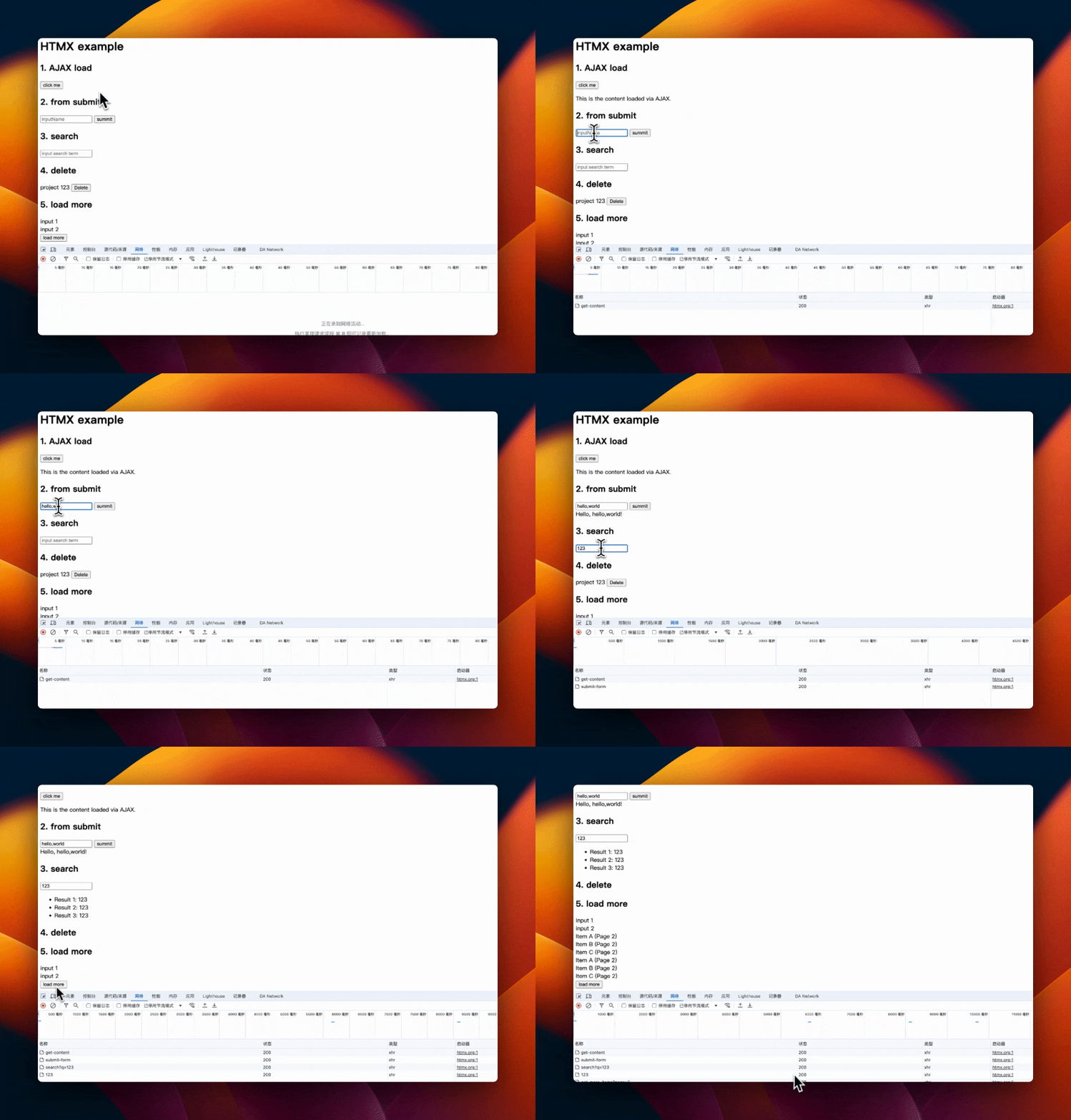
Code Example
#### 1\. AJAX load content
Suppose you have a server-side URL `/get-content` that returns some HTML content. You can use the `hx-get` attribute to create a button that, when clicked, will asynchronously load the content and insert it into the specified element on the page.
```html
1. AJAX load
```
#### 2\. submit form
You can use `HTMX` to submit forms asynchronously. This means that the user can submit the form without refreshing the page, and the response to the form will be displayed directly on the page.
```html
2. from submit
```
#### 3\. search
Using `htmx` it is also very easy to create live search forms where the search results can be constantly refreshed as the user types in the search box, an example of which is shown below:
```html
3. search
```
The content typed in the search box will be sent to `/search?q=`, and the server needs to return the appropriate search results based on the query parameter `q`.
#### 4\. Delete
With `HTMX`, you can easily realize to delete items without refreshing the page:
```html
4. delete
project 123
```
When the button is clicked, a DELETE request is sent to the server to delete the item with ID 123.
### 5\. load more
Create a “Load More” button that, when clicked, loads the next page of content.
```html
5. load more
input 1
input 2
```
In practice, you must dynamically update the `page` property parameter to load the correct content page.
Instead of relying on JavaScript, `HTMX` allows you to add rich interactivity through HTML, and these examples show just a few of the features of `HTMX`. You can learn more about advanced features and usage by checking the official `HTMX` documentation.
### A list of command tags
`HTMX` works through a set of custom HTML attributes, which usually begin with the prefix `hx-`. These attributes can be added to the standard HTML tag for various dynamic behaviors. The following are some commonly used `HTMX` attributes (commands and labels):
#### Core Attributes
- `hx-get`: Initiate an AJAX GET request.
- `hx-post`: Initiate an AJAX POST request.
- `hx-put`: Initiate an AJAX PUT request.
- `hx-delete`: Initiate an AJAX DELETE request.
- `hx-patch`: Initiate an AJAX PATCH request.
- `hx-trigger`: Define events that trigger AJAX requests, such as `click`, `keyup`, etc.
- `hx-target`: Specify which element will be replaced or updated by the requested response.
- `hx-swap`: Define how to insert the response content into the target element, such as `innerHTML`, `outerHTML`, `beforebegin`, `afterend`, etc.
#### Enhance attributes
- `hx-params`: Control which parameters are included in the request, such as `none`, `*`, `vals`, etc.
- `hx-include`: Specify which element values should be included in the request parameters.
- `hx-indicator`: Specify one or more elements and display them as loading indicators when the AJAX request is in progress.
- `hx-push-url`: Control whether to push the URL of `AJAX` request to the browser's history.
- `hx-prompt`: Prompt the user to enter the message before initiating the request.
- `hx-confirm`: Ask the user to confirm before operating.
#### Response processing
- `hx-select`: Select part of the content from the AJAX response to update instead of the entire response.
- `hx-headers`: Allow the setting of custom request headers.
#### Event Attributes
- `hx-on`: Specify specific events and their handling, such as `hx-on="click: doSomething"`.
#### Web Sockets
- `hx-ws`: Define the behavior related to WebSocket connection.
#### Tool Attributes
- `hx-boost`: Automatically enhance the links and forms on the page to make them work asynchronously through AJAX.
- `hx-history-elt`: Specify an element whose content change will trigger the update of the browser history.
### My opinion on `HTMX`
Everyone has many different views on this technology.
- This is said to have happened 15 years ago, and integrating the front and back ends is not conducive to maintenance.
- Some people also say that “handwriting grammar tree in `XML`" is outdated and unsuitable for modern large-scale software engineering.
“High power tools for HTML” is written on the homepage of the \[official website\] ([https://htmx.org/](https://htmx.org/?ref=huizhou92.com)) of `HTMX`. The success of a technology depends on the degree of recognition by most people in the future.
My current opinion `HTMX` is as follows:
The core idea of `HTMX` is to use HTML language to obtain data, as well as asynchronous form submissions and other interactive scenarios. There is no need to use `JS` knowledge and some frameworks nor to learn front-end construction engineering.
The back-end returns its front-end code, which is suitable for back-end engineers to make simple interactive interfaces. If you need to make complex pages, `HTMX` does not support or currently has limited support. `HTMX` has many advanced features, and it is not particularly easy to master.
`HTMX` allows developers not only to learn `JavaScript` but also to learn `HTMX`, and the curve does not decrease.